

Zsh :: Weird Right Prompt
· 1 min read
Tinkering at
zsh
settings, I accidentally came across a very interesting
solution
for the right-side prompt. Everybody who runs zsh on her notebook should definitely take a glance. The right-side prompt usually holds an unnecessary garbage, like either clock or
tty id
. That’s why I really like an idea to put there a battery charge indicator. Depending on the battery level, the notifier is to be shown in green, yellow or red.
The inventor of the solution used the far-fetched python to retrieve the battery charge level. I decided to rewrite the whole stuff using native shell. The result looks like this:
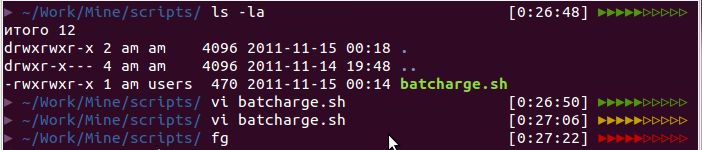
The code below has been tested on Ubuntu, though it should work fine on any linux distribution and even MacOSX under zsh. Well, code talks while bullshit walks. Let’s proceed.
Right prompt in zsh is being set with an environment variable
RPROMPT
. Here is a piece of code that is to be put in the end of
~ /.zshrc
file (or
~/.oh-my-zsh/themes/THEME_OF_CHOICE
if you are already addicted to
oh-my-zsh
):
function battery_charge {
  # Battery 0: Discharging, 94%, 03:46:34 remaining
  bat_percent=`acpi | awk -F ':' {'print $2;'} | awk -F ',' {'print $2;'} | sed -e "s/\s//" -e "s/%.*//"`

  if [ $bat_percent -lt 20 ]; then cl='%F{red}'
  elif [ $bat_percent -lt 50 ]; then cl='%F{yellow}'
  else cl='%F{green}'
  fi

  filled=${(l:`expr $bat_percent / 10`::▸:)}
  empty=${(l:`expr 10 - $bat_percent / 10`::▹:)}
  echo $cl$filled$empty'%F{default}'
}
RPROMPT='[%*] $(battery_charge)'
The algorithm is simplier than an amoeba in it’s extramarital period:
-
Receive and parse the battery from
acpi(you may need to install it withsudo apt-get install acpi); - Specify a color to display (red, if less than 20%, yellow is under 50%, green otherwise);
- Paint filled triangles for the enegry left, unpainted for the rest;
- Put the result into the right prompt.
This post is just an illustration of the principle “Spend three minutes and make your life more comfortable for years.” If you are, of course, an adept of the console, like me. I know that I didn’t make the code shine, probably because I don’t spend most of my life watching at my shell configs.
Just in case I have one more trick als Nachspeise . The following snippet prints a return code of a previosly executed command:
RPROMPT='%{$fg[red]%} ⏎ $? %{$reset_color%} '$RPROMPT