

256 Color Term (Nightmare Level)
· 2 min read
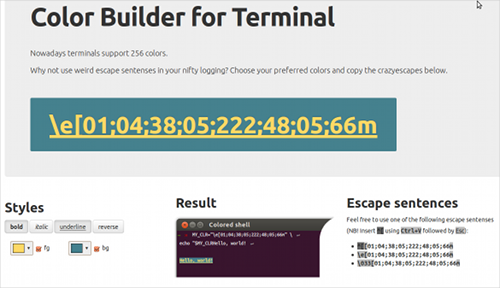
I’m currently reinventing a wheel, driving a long debug output to
stdout
. I finally came to conclusion that the only way not to get my eyes broken leads to colorizing all the output. Modern terminals like
xterm
are able to show 256 colors, they do even like it. But those mastodons who are still giving their
VT100
a dust, have curly escape-sequences chosen to show a rainbow up. I revere a backward compatibility; I even have a latent tendency to cryptographic empiricism… You know, it took me a couple of hours to sort the stuff out. Internet gave not a rich detailed explanation, as well.
Nowadays a text in the X-terminal may appear in an ornate way. That’s why I came with jotting down a web-service. It’s likely a WYSIWYG for escape-sequence generation. One choses colors, font styles etc and finally gets a bundle of flourishes.
Colors in xterm
For a terminal to realize that it can show 256 colors, we should aknowledge it about:
case "$TERM" in
  'xterm') TERM=xterm-256color;;
  'screen') TERM=screen-256color;;
  'Eterm') TERM=Eterm-256color;;
esac
The color itself is encoded in quite breathtaking manner. Escape-sequence is starting with the traditional
\e[
and ending with
m
. It consists of
flags
, the
color of the background
and the
text color
. Flags for bold, italic, underline and inverse (fg ⇐
01
,
03
,
04
and
07
respectively (there is a flag for the flashing as well, but what if there are children reading this?) Flags to cancel the style are
22
,
23
,
24
,
27
. Flags can be written in simultaneous order, one after another, separated by semicolons. There must be no semicolon just before the final
m
.
The text color signature is
38, 05; COLOR;
. The same for background color is
48, 05; COLOR;
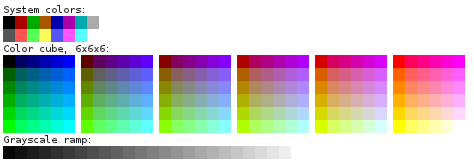
. The color here is an integer ∈ [1, 255]. The first sixteen items are well-known old-school terminal colors, the last 24 are shades of gray, and the rest… well, these are the remainder colors.
Something like that (thanks FedoraProject for the picture):
It is easy to see that the sequence
\e[01;04;38;05;196;48;05;232m
turns the mode of a bold underlined red text on a black background. Haha.
How to get a color, huh?
It turns put that colors are encoded in the remaining 256 - 16 - 24 = 216 choices using a simple and straightforward algorithm. A range of tones is calibrated against division modulo 6. That number is treated as RGB-constituent in 6-based notation with “zero in sixteen”. For orange (
#ff9900
) it gives
16 + 5 * 6² + 3 * 6 + 0 = 214
). There are exceptions; they will be there any time. Those “standard” old-school colors and grayscale. Yeah.
Who the hell does need that?
Well, first of all, I was curious. Secondly, three hours are three hours. Furthermore I have now my logfile so weird-colored that it’s became totally ununderstandable. Plus
PS1
is surely re-written from scratch.
In general, if you need an escape-sequence for some color—here’s a WYSIWYG . If somebody likes to examine spaghetti-like write-only javascript code, welcome @[github](https://github.com/mudasobwa/TermColorBuilder) .