YADR for Dummies
· 1 min read
I spend a half of my life in the terminal window (another half is being wasted even sillier.)
A couple of years ago I switched to
zsh
, then I met
oh-my-zsh
,
I even wrote my own theme for it, with blackjack and
battery charge indicator
.
From time to time I tuned the theme up, played with newly investigated vim tricks etc. I switched from
oh-my-zsh
to
prezto
, but I anyway felt myself a little bit deprived.
Accidentally I stumbled upon
YADR
. The project headline states
“YADR is the best vim, git, zsh plugins and the cleanest vimrc you've ever seen.” And you know what?—That’s true.
Try it youself and I swear you never decide to turn back to your crude homebred dotfiles.
An installation is as easy (you already have ruby installed, haven’t you?) as:
git clone https://github.com/skwp/dotfiles ~/.yadr
cd ~/.yadr && rake install
The only polish required (in my opinion) is the proper theme. So, here we go. I teached the pretty Agnoster theme to show proper right prompt with current gemset, current ruby version etc. If you are not as to Ruby as me, you’ll find a better application for it.
To install the theme you’ll need:
- install a Powerline-patched font for the theme special symbols to render correctly
-
grab the
theme file
and put in into
~/.zsh.prompts/prompt_mudasobwa_setup -
put the following three lines in the end of your
~/.zshrcfile:
  $ autoload -Uz promptinit
  $ promptinit
  $ prompt mudasobwa
-
restart
zsh
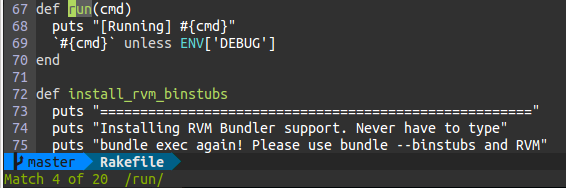
The screenshots below show only the visual effectiveness of the theme; the cymes is in details. Everyone is to be exalted about it’s power and scared kinda “why didn’t I switched to it yesterday.”
Inside git branch:

With background jobs (the blue gear on the left) and non-zero exit status from the previously run command:

VIM status line: